How AI Agents Actually Work
The hidden workflow behind tools like Cursor, Claude Code, and Devin

You ask Cursor a simple question:
“Where is the authentication flow implemented?”
Within seconds, it comes back with a clear answer — a route handler, a middleware file, a config entry — and explains, in plain English, how the three connect.
It feels almost magical.
But pause for a moment.
What actually happened in those few seconds? Did it search filenames first? Did it grep the repository for auth? Did it open middleware before routes? Did it inspect configuration files?
And the most interesting question: how did it decide what to do first?
That instant reply is not magic. It’s the result of a hidden workflow.
Once you understand that workflow, AI agents stop feeling mysterious and start looking like engineering systems you can reason about, debug, and extend. And that — knowing what’s going on under the hood — changes how you use them entirely.
Let me show you what’s underneath.
Think about how you’d do it
Before we look at what the agent does, think about how you’d answer that same question yourself — in an unfamiliar codebase, on a new project.
You wouldn’t just know. You’d go find it.
Open a terminal, search for “auth” across the repo, see which files come up, open the most promising one, follow a reference or two, piece together an answer.
It’s a process. Not memory — exploration.
Modern AI agents do exactly the same thing. They don’t retrieve answers from some giant internal dictionary of your codebase. They explore it, gather clues, and construct understanding one step at a time.
This pattern has a name: the agent loop.
The Agent Loop
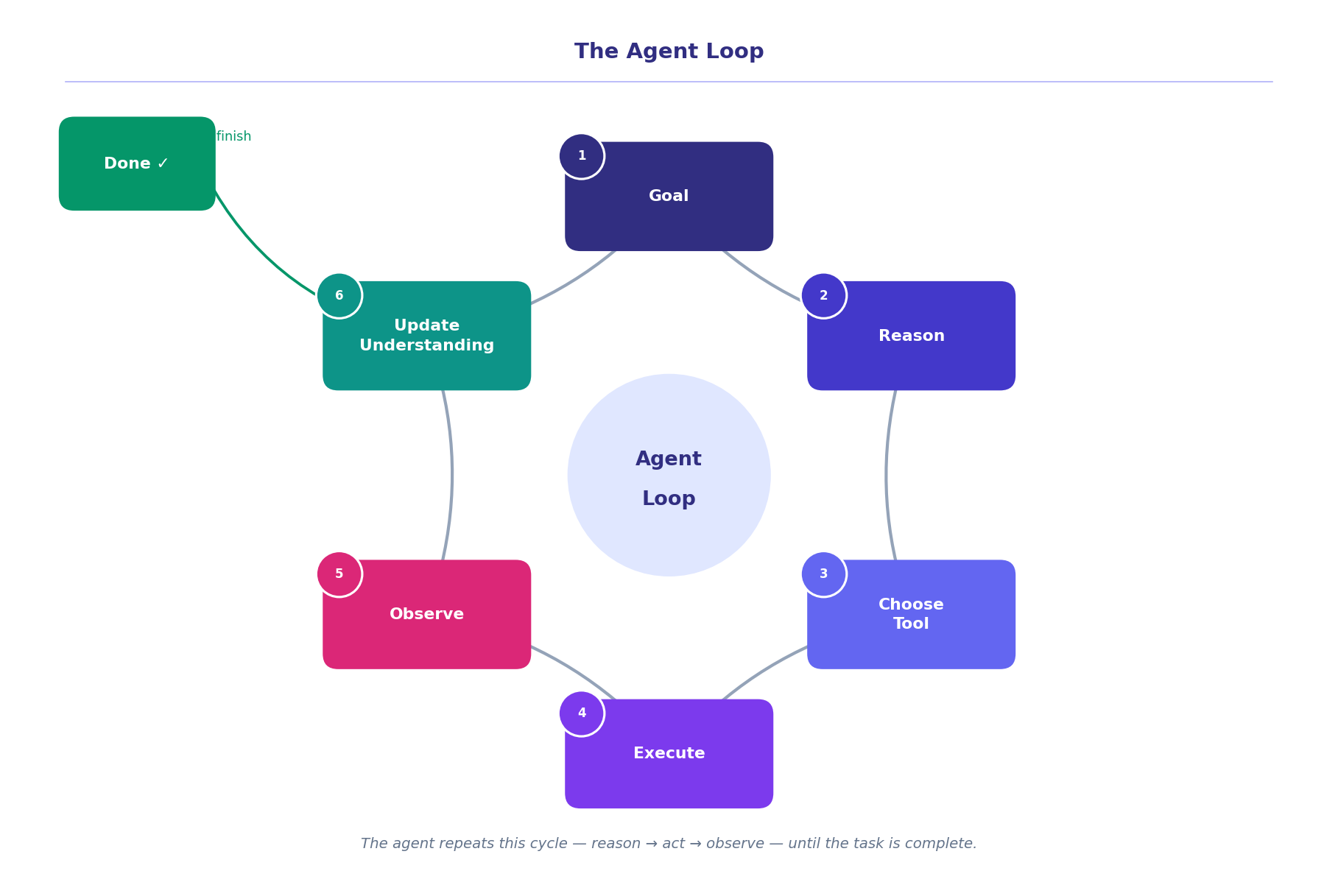
At the core of every AI agent is a cycle. It runs over and over until the job is done:
Goal → Reason → Choose a tool → Execute it → Observe the result → Update understanding → Repeat or finish.
Let me trace our authentication question through it.
The agent receives the question. It reasons: probably some combination of middleware and routes — let’s start with a search. It picks a search tool and runs grep "auth" across the repository. The search returns a list of candidate files. The agent looks at the list, opens the most likely file, reads it, finds the middleware logic. It notices a reference to a login route. It follows it, opens the route file. Checks the config.
Then it assembles everything into an explanation and delivers it.
What looks like one answer is actually five or six reasoning cycles happening in less time than it takes to reach for your coffee mug.
Tools: The Agent’s Hands
For that loop to work, the agent needs a way to actually interact with the world. These are called tools, and they are exactly what they sound like.
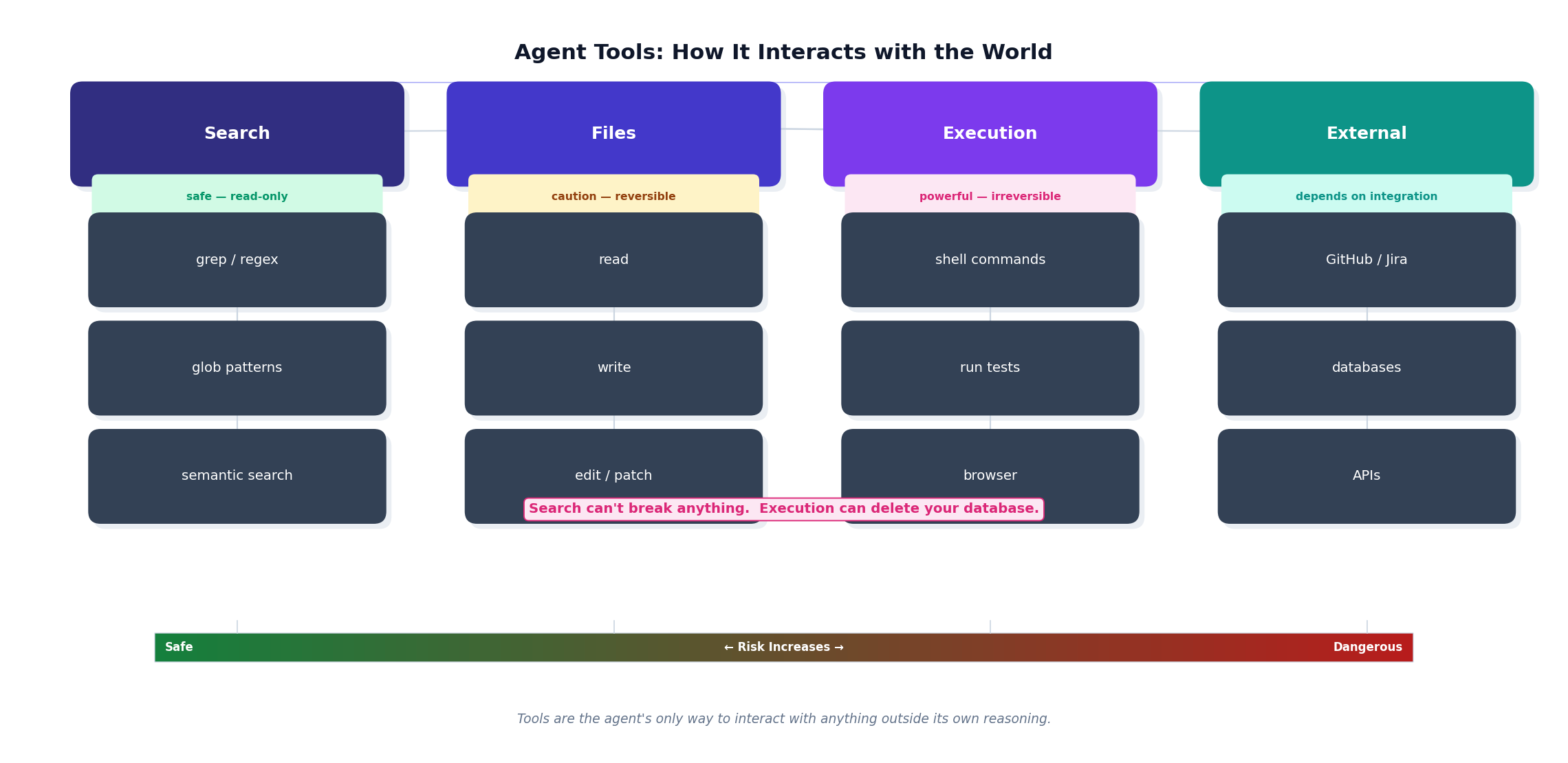
Think of tools as the hands the agent reaches out with. Without them, it can think but it can’t do.
There are a few main categories:
Search tools let the agent find things — grep for exact matches, glob for file patterns, semantic search when it’s looking for a concept rather than a keyword.
File tools are how it reads, writes, and edits code. When Cursor actually changes a file, it’s using a file tool.
Execution tools let it run commands — shell scripts, terminal commands, sometimes even browser interactions.
External tools connect it to the world beyond the local codebase — GitHub, Jira, internal APIs, databases.
In our authentication example, the agent only needed search and file tools. But for a more involved task — say, creating a pull request with test coverage — it might cycle through all four categories in a single run.
The key insight is this: the agent’s capability is bounded by its tools. Give it better tools, and it can do more. Give it the wrong tools for a job, and it’ll struggle. This is why the tool configuration in your agent setup matters far more than most people realise.
The Library Problem: How It Finds the Right Files
Here’s a practical challenge. Most real codebases have thousands of files. The agent can’t read them all — it would run out of memory (what’s called the context window) before it got anywhere useful.
So it doesn’t try.
Instead, it retrieves only what’s relevant before it starts reasoning. This approach has a slightly intimidating name — retrieval-augmented generation, or RAG — but the idea behind it is completely intuitive.
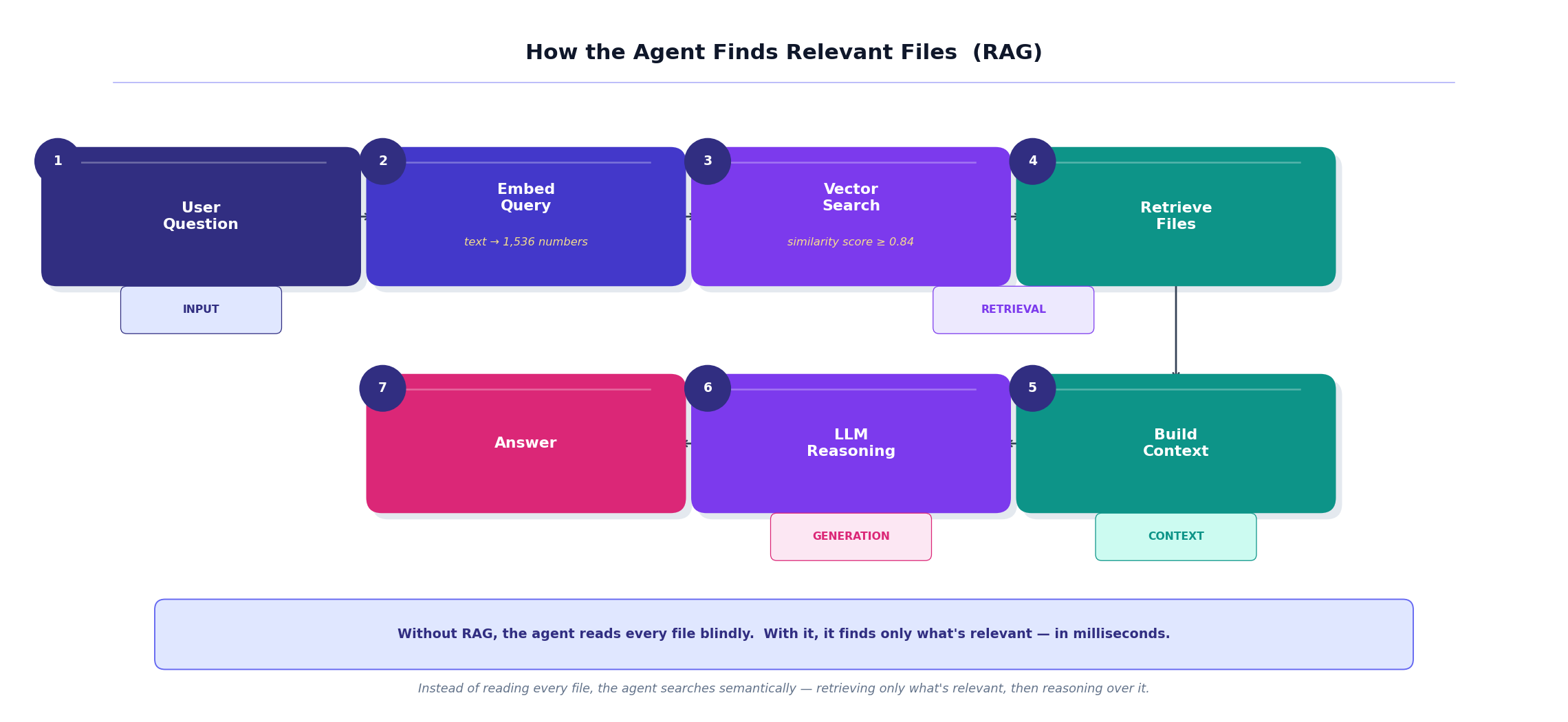
Imagine walking into a library with 50,000 books to find information about a specific regulation. You don’t start at shelf one and read every book. You go to the index, identify the three most relevant titles, pull those books, and work from there.
AI agents do the exact same thing. Your question gets converted into a mathematical representation (an embedding), that representation gets compared against embeddings of every file in the repo, the most relevant files surface, and those files become the agent’s reading material for this particular task.
For our authentication question, that probably means middleware/auth.py, routes/login.py, and config/auth.yaml land in context. The other 4,997 files don’t.
The search part happens in milliseconds. The reasoning over those retrieved files is what accounts for the rest of those “few seconds.”
When the Task Gets Harder
Now imagine a different request:
“Add OAuth provider support to the authentication system.”
This isn’t a question anymore. It’s a task — and a meaningful one. Writing it badly could break your login for thousands of users.
A thoughtful engineer wouldn’t just start typing. They’d first understand the system, then form a plan, then execute. Ideally, they’d show you the plan before touching anything.
Many AI agents increasingly mirror exactly this way of working. They support different levels of autonomy — and knowing which to use, and when, changes everything about how well they perform.
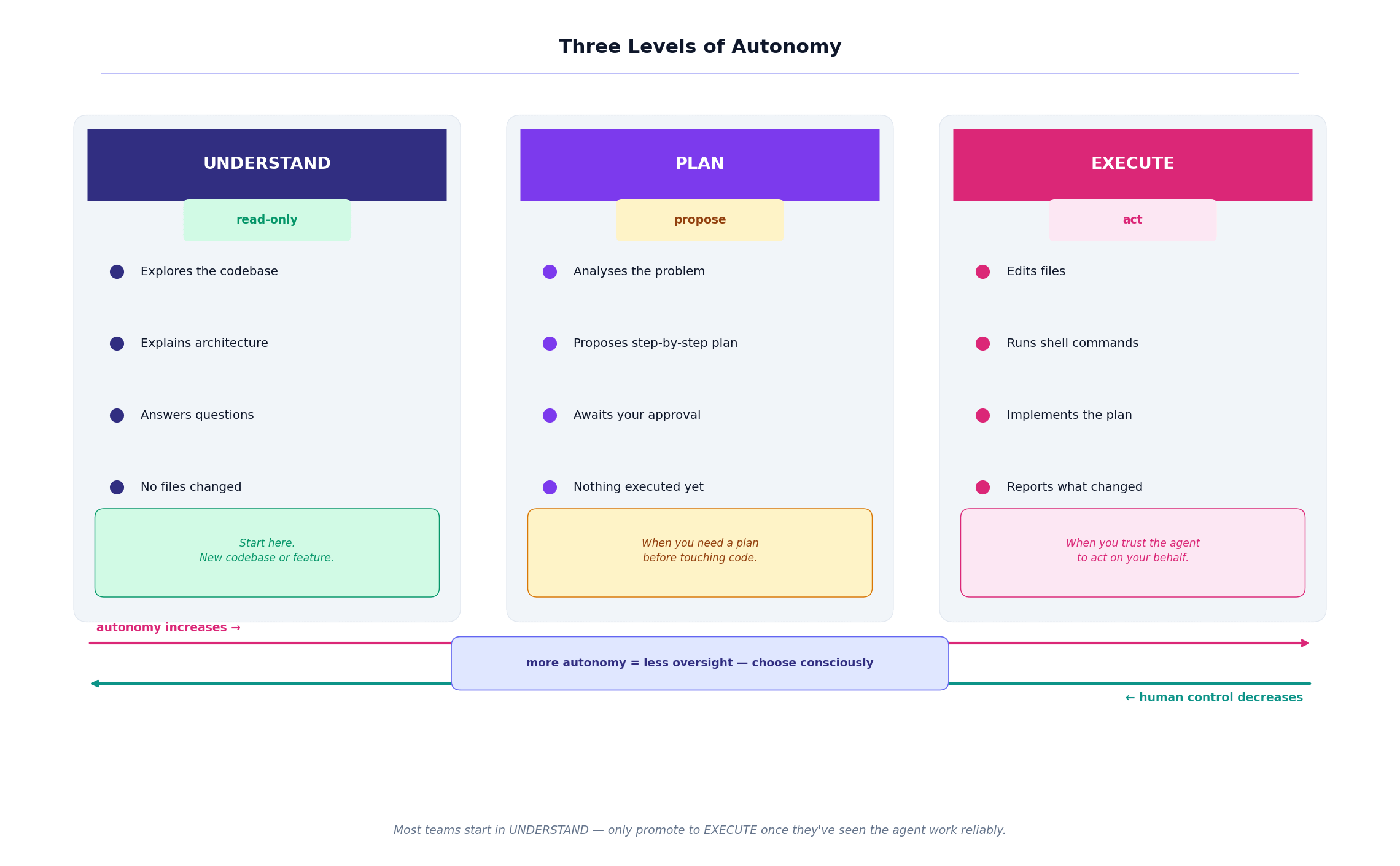
Ask mode is pure exploration. The agent pokes around the codebase and explains what it finds. Nothing is changed. This is what happened when you asked about the authentication flow.
Plan mode is analysis before action. The agent proposes a structured approach — step by step — and waits for your approval before touching a single file. Something like: introduce an OAuth provider interface, extend the middleware, update the login route, add configuration, write integration tests.
Agent mode is full execution. The agent edits files, runs commands, implements the plan. It’s powerful, and it’s what impresses people in demos.
Here’s the thing nobody tells you: most people jump straight to agent mode for everything. That’s usually a mistake. The same instinct that makes you want a junior engineer to talk through their approach before refactoring your core auth system applies here too.
Use ask mode to understand. Use plan mode to agree on direction. Use agent mode to execute. In that order.
Watching It Think
One of the genuinely surprising things I discovered about modern agents is that you can often watch them work.
Instead of a black box that returns an answer, a well-designed agent emits a stream of events as it runs:
system       → session initialised
user         → "Where is authentication implemented?"
thinking     → searching repository for auth-related files
tool_call    → grep "auth"
tool_call    → read middleware/auth.py
tool_call    → read routes/login.py
assistant    → "Authentication begins in the login route..."
result       → completed
This is called observability, and it’s more valuable than it first appears.
When an agent does something unexpected — and they do, regularly — this event stream is the difference between figuring out why in ten minutes and spending an entire afternoon confused. You can see exactly what it searched for, what it opened, what it chose to skip, and where its reasoning went sideways.
I’ve found that reading the tool calls is often more illuminating than reading the final answer. The answer tells you what the agent concluded. The tool calls tell you how it got there — which is where the real insight lives.
The Guardrails You Don’t Always Notice
Agents can run shell commands. Edit and delete files. Some can browse the internet or call external APIs. That’s a lot of power to hand to a probabilistic system running on your production codebase.
Which is why well-designed agents ship with safety mechanisms — mechanisms you often don’t notice until something triggers one:
Permissions — which directories or systems can the agent access?
Sandboxing — can it run arbitrary commands, or only a pre-approved set?
Approval gates — does it pause and ask before doing something irreversible?
Trust settings — how much autonomy does it get in different contexts?
These aren’t just product features. They’re what separates an agent you can trust to run unsupervised on a complex task from one that occasionally does something you can’t easily undo.
When evaluating any agent-powered tool, the safety architecture matters as much as the capability ceiling. A less capable agent with good guardrails is almost always preferable to a more capable one without them.
The Full Picture
Let’s zoom all the way out.
When you put the pieces together, modern AI agents share a remarkably consistent architecture — whether you’re looking at Cursor, Claude Code, Devin, or a custom agent you’ve built yourself in LangGraph.
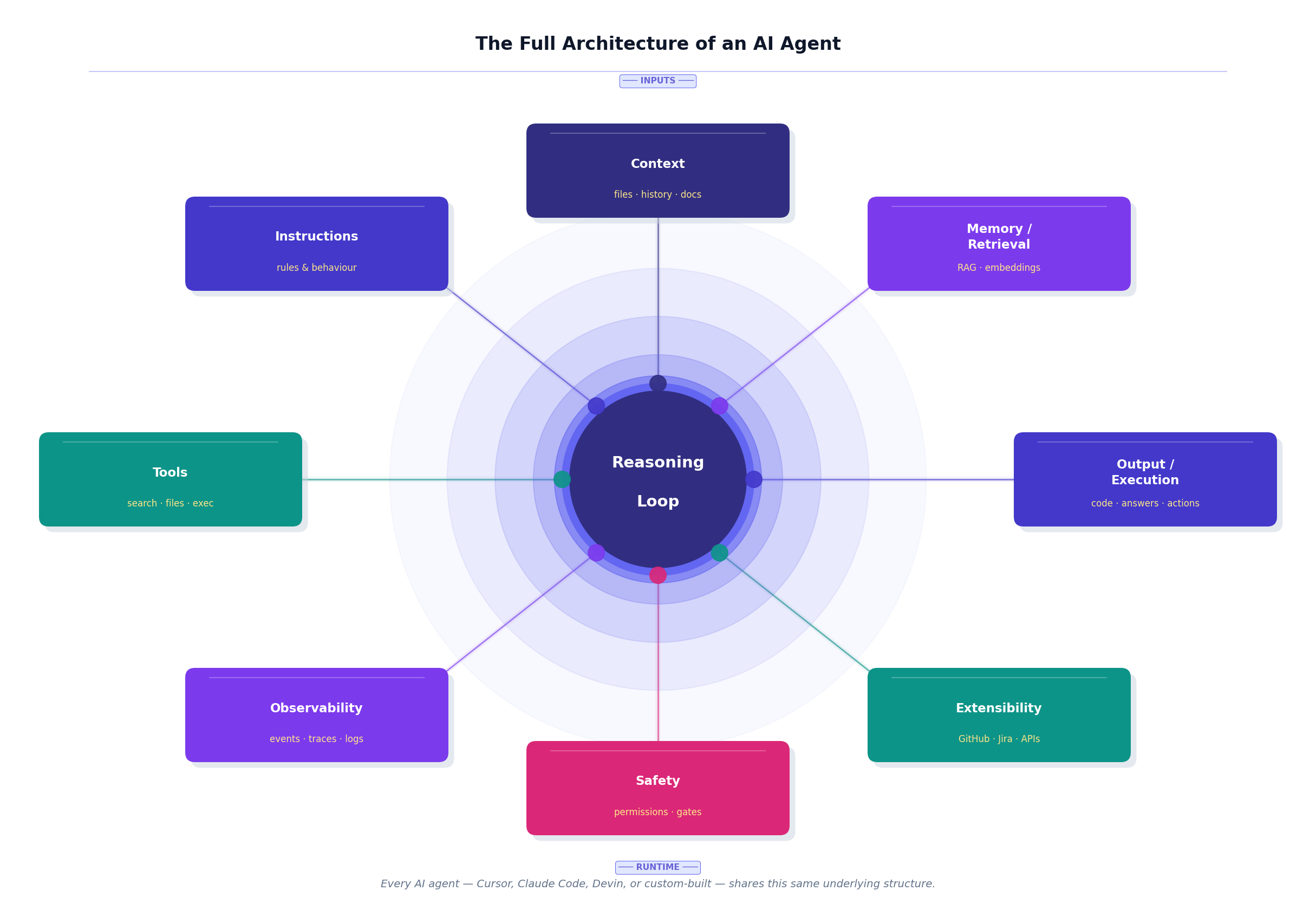
Instructions shape how the agent behaves — like a team playbook or a set of house rules.
Context is what it knows right now — retrieved files, conversation history, relevant documentation.
Memory and retrieval is how it finds what it needs — the library index we talked about earlier.
Tools are how it acts in the world.
The reasoning loop coordinates everything, cycling through until the task is done.
Observability lets you see what happened — the event stream, the traces, the logs.
Safety keeps the system under control, especially when it’s acting with high autonomy.
Extensibility connects it to everything outside the codebase — GitHub, Jira, your internal APIs, whatever your engineering workflow runs on.
Each of those layers is a design choice. Swap out the retrieval system, and the agent finds different things. Change the tools, and it can do different actions. Adjust the instructions, and its whole personality shifts. This is why tuning agents is a craft — there’s an enormous amount of meaningful variation within the same underlying structure.
Why This Changes How You Use These Tools
I started this post saying I used Cursor like a fancy search bar.
After internalizing this architecture, I use it completely differently.
Now when I write a prompt, I think: what tools will this actually trigger? What files will the retrieval step surface? Is this really an ask-mode question, or am I asking agent mode to do something I should plan first?
When something goes wrong, I look at the tool calls instead of blaming the model. The model is usually fine. The prompt, the tool config, or the context is usually the culprit.
When I set up a new project, I think carefully about what instructions and context to provide upfront — because I know the agent will use them to reason, not just as background reading.
The agents haven’t changed. My mental model has.
And that shift — from this feels like magic to I understand how this works — is where you go from being a passive user of these tools to someone who can design, debug, and extend them.
That’s where the real power begins.